BCBS Prior Authorization
Purpose
To submit and document a BCBS prior authorization (PA) request for rehabilitation services through the Health Management portal, and to confirm whether the patient’s policy requires authorization.
When
Use this process when a patient has BCBS insurance and the office needs to verify or obtain prior authorization for rehabilitation/physical therapy services.
Who
This process should be completed by the insurance verification / prior authorization coordinator, CA, or designated front office team member responsible for authorizations.
Procedure
1. Log into the BCBS website
Log into the BCBS provider portal using the office credentials.
Purpose: To access the patient’s benefit and authorization tools.
2. Open Health Management
From the main portal, click Health Management.
Purpose: This section contains the authorization and specialty care request options.
3. Enter the Member ID Prefix
In the Member ID Prefix field, enter the first 3 characters of the patient’s insurance policy number.
Examples:
- YPS
- Y2U
Purpose: This directs you to the correct BCBS plan and authorization pathway.
4. Open Diagnostic and Specialty Care
Click the Diagnostic and Specialty Care link. This will open in a new window.
Purpose: This is where rehabilitation requests are started.
5. Select Rehabilitation and Start Order Request
Once the patient information is loaded, select Rehabilitation and then click Start Order Request.
If Rehabilitation cannot be selected:
This means the patient’s policy does not require prior authorization for rehab.
In that case:
- Select Print Preview
- Save the preview for documentation
- Make an alert in the patient chart stating that no PA is required for rehab per BCBS portal
Purpose: To confirm whether authorization is required before moving forward.
6. Confirm patient information
Review the patient’s information for accuracy, then click Continue.
Purpose: To ensure the request is attached to the correct patient.
Condition & Services Section
7. Enter diagnosis and service code
Enter the patient’s chief diagnosis code.
- If unsure, ask Dr. Mays
- For back pain, enter: M99.03
- Service/CPT code: 97140
Purpose: To identify the condition being treated and the service being requested.
8. Select therapy type
For Therapy Type, select Physical Therapy, then save.
Purpose: To classify the request correctly.
Clinical Questions
9. Autism services question
Question: Is this a request to provide autism services for a confirmed diagnosis of autism spectrum disorder or pervasive developmental disorder...?
Select: No
Purpose: This question does not apply to standard chiropractic rehab requests.
10. Initial evaluation performed
Question: Was an initial evaluation performed by a therapist or a licensed qualified provider of therapy services?
Select: Yes
Purpose: Confirms that the patient has already been evaluated.
11. Enter initial evaluation date
Enter the patient’s initial evaluation date.
Refer to:
- Date of Onset, or
- SOAP note
Purpose: This supports medical necessity and treatment timing.
12. Functional Tool
For Functional Tool, select:
ODI – Oswestry Low Back Pain Disability Questionnaire (0–50 points)
Then:
- Click Add Tool
- Enter the patient’s score
Purpose: This provides measurable functional limitation data required to continue.
Provider Information
13. Ordering Provider Search
Search for:
- Clifton Mays
- City: High Point
Purpose: To assign the request to the correct provider.
14. Select provider
Under Provider Results, choose the first option.
Then check the box: Ordering provider is also the Treating Therapist
Purpose: To correctly link the rendering and ordering provider.
15. Servicing Facility billing question
Question: Will the Servicing Facility be billing for the request?
Select: Yes
Purpose: Confirms the treating office is the billing location.
16. Confirm facility
The office should populate automatically.
Select it and confirm it is listed as an office, then continue.
Purpose: Ensures the request is tied to the correct facility.
Start Clinical
17. Primary purpose of therapy
Question: Which of the following best describes the primary purpose of therapy?
Select: Rehabilitation
Purpose: Identifies the overall treatment goal.
18. Primary treatment method
Question: Will any of the following be used as a primary treatment?
Select: None of these apply
Purpose: Confirms that no special treatment category applies.
19. Complexity level
Question: What is the complexity level of the evaluation or E&M equivalent that was completed for this request?
Confirm this option with Dr. Mays, then select:
Moderate complexity (CPT 97162 or E&M 99203, 99204)
Purpose: Ensures the clinical level selected matches the provider’s evaluation.
20. Recent surgery question
Question: Did the patient have a surgical procedure in the last three (3) months related to the conditions for which services are being requested?
Select: No
Purpose: Determines whether post-surgical criteria apply.
21. Onset timing question
Question: Did the onset of the injury or condition occur within the last six (6) months?
Select: Yes
Purpose: Supports the rehabilitation timeline and medical necessity.
22. Complex condition question
Question: Is the requested treatment for a complex neurological, medical, or multi-trauma condition?
Select: No
Purpose: Confirms this is a standard rehab request.
23. Conditions impacting treatment
Question: Select all conditions expected to impact treatment
Select: None of these apply
Purpose: Indicates there are no additional complicating factors affecting care.
24. Attestations
Complete all required attestations and click Save.
Purpose: Finalizes the clinical details required for submission.
25. Contact information prompt
If prompted for both the patient’s phone number and email, select Unable to provide both in order to continue.
Purpose: Allows the request to move forward if complete contact details are not available.
Final Review and Submission
26. Review print preview
Select Preview and carefully verify that all information is correct.
Check:
- Patient information
- Diagnosis code
- CPT code
- Evaluation date
- ODI score
- Provider and facility details
Purpose: Prevents errors before submission.
27. Submit order
Submit the order.
Purpose: Sends the PA request for review.
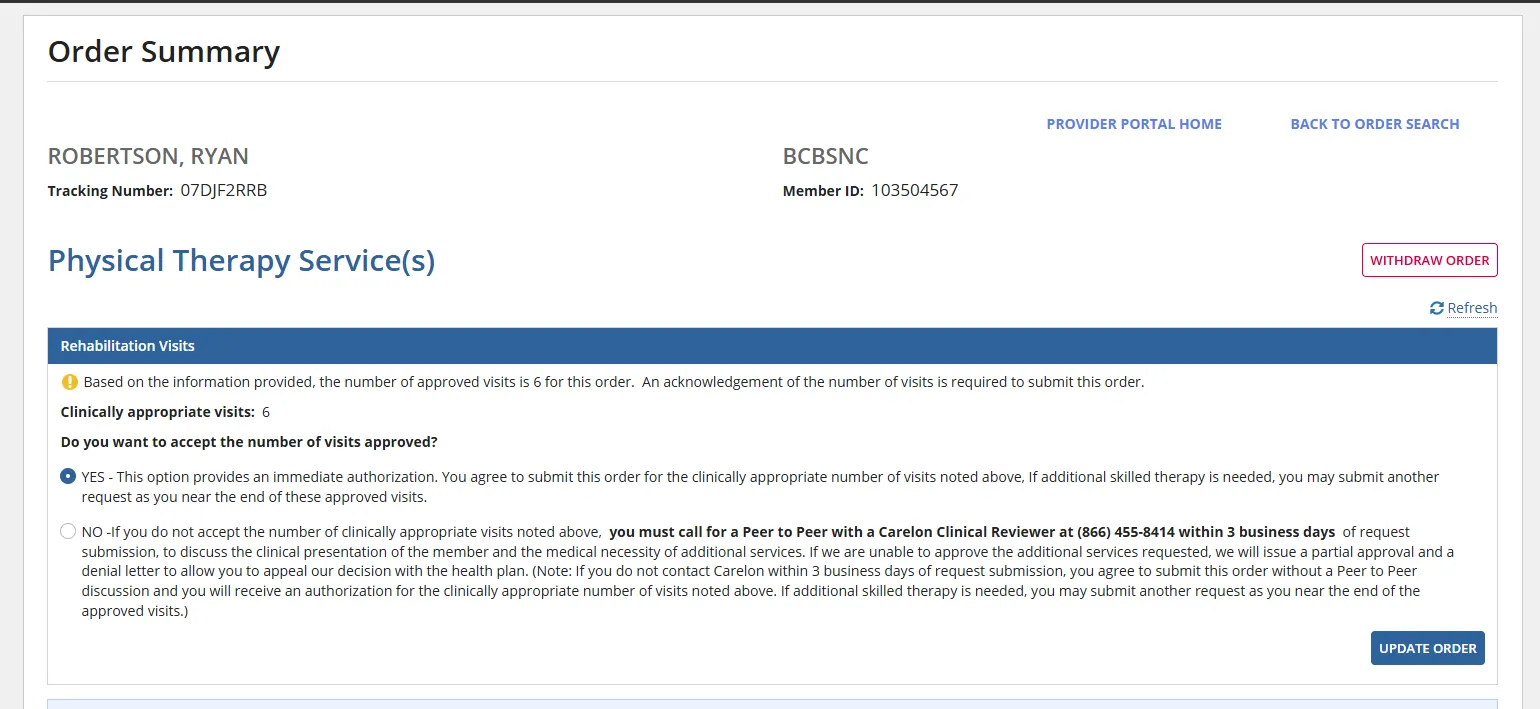
28. Accept and update order
In most cases, you should receive immediate results.
When prompted:
- Select Yes to accept
- Update the order as required
Purpose: Completes the authorization process and records the result.
Documentation
After completion, document the outcome in the patient chart.
Include:
- Whether PA was approved, not required, or pending
- Authorization/order number if applicable
- Date completed
- Any saved print preview or confirmation
Purpose: Maintains accurate records for billing and follow-up.
Quick Notes
- If Rehabilitation is not selectable, the policy does not require PA for rehab
- Save the print preview
- Add a chart alert
- If diagnosis or complexity level is unclear, confirm with Dr. Mays